Sunday, July 26, 2009

Is Chromium better than Google Chrome?

What is Chromium?
Google Chrome has made a big splash in the browser pond even though it's still feature poor compared to more mature browsers like Internet Explorer, Firefox and Opera. Many people would agree that the biggest share of this newbie browser's success is due to the big marketing muscles that Google can flex. Just as many people aren't aware that Google's browser success is also due to the fact that it's a branded version of the free and open source Chromium browser.

The Chromium project is the test bed for most of the new features that end up Google's browser. There aren't many visible differences between Chromium and Google Chrome so you may find that the line between the two is pretty blurry. But if you want the latest features, surfing speed and simplicity, you may want to try out the latest build of the Chromium web browser. You can even run it as a portable application so that it won't interfere with any of your installed browsers. I'll tell you how to do that and offer you a few tips as well.

News Flash 8/4/05: Themes for Google Chrome are now available and work well in Chromium and the Portable Chrome I’ve mentioned below.

Where's the download?
If you went looking for Chromium, it's very likely you'll only end up finding places to download Google Chrome. It's not hidden, but it's surely not well advertised. The Chromium testers have a page where they host packaged versions of the daily builds. Once there, you can choose to download a EXE file with a built in installer, or a ZIP version.

Chromium Download
http://build.chromium.org/buildbot/continuous/win/LATEST/chrome-win32.zip (manual install)
http://build.chromium.org/buildbot/continuous/win/LATEST/mini_installer.exe (exe installer)

There are beta versions available for those wishing to try out Chromium for the Mac and Chromium for Linux. These versions are still partially broken but work on them continues.

Chromium for Mac and Linux
http://build.chromium.org/buildbot/continuous/

How do I install Chromium?
I recommend downloading the chrome-win32.zip package. Once I've done that, I simply unpack the zip file into a folder and I run it from that location after creating shortcuts to chrome.exe. The mini-installer.exe package does not allow you to choose where Chromium is installed. It places the application files into a hard to find subfolder under your Documents and Settings. I think that's a terrible place to store applications.

I can also recommend using the Portable Chrome package which can be found at a German blog by a person named Caschy. The portable version does not store your profile, history and cache files in your Documents and Settings folders.

Portable Chrome Download
http://stadt-bremerhaven.de/category/google/

This portable package is downloaded as an EXE file, but it's a simple self extracting archive which will only ask you where you want to unpack the files. Caschy's portable Chromium package may not be as up to date as the packages at the build.chromium.org site. I always update my Portable Chrome by downloading the latest chrome-win32.zip and unpacking it into the "Chrome" subfolder in my Portable Chrome folder. I make sure that I launch Chromium using a shortcut to the ChromeLoader.exe file in the Portable Chrome folder.

Some of you may be aware that even Chromium, like Google Chrome, still contacts Google servers. If this concerns you, you can always download a portable version of SRWare Iron which is another version of Chromium which doesn't contact any outside servers at all. It does get updated occasionally but I always want the most up to date version of Chromium and for that reason alone I put up with the connections to Google. I typically have a tab or two open to either Google Mail or Google Reader in any case and I'm not too concerned about sharing my surfing habits.

Download SRWare Iron (web browser for privacy fanatics)
http://www.srware.net/en/software_srware_iron.php

How do I add more features to Chromium?
Right now, extensions (addons) aren't well supported but they can be used. I have tried using them with only limited success. I've found the best method is to use javascript Bookmarklets which often allow you to do many of the same things that the addons in Firefox do for you. For those of you who aren't familiar with Bookmarklets (or Favlets for IE users), these are simply bookmarks that you can drag to your Bookmark toolbar and click on when you are at a web page where they'll do a job for you. The very same bookmarklets I use in Chromium often work just as well in Firefox and Internet Explorer. This fact makes it easier to switch between browsers when you need to. Below is a short list of my favorite Bookmarklets and some links to other lists of Bookmarklets that others find useful.

My favorite Bookmarklets

  • LastPass Login - quickly fills in all your usernames and passwords for web logins - requires a free account at Lastpass.com
  • Delicious Bookmark - allows you to post your favorite bookmarks online - requires a free account at Delicious.com
  • su.pr - allows you shorten URLs and to make simultaneous posts to Twitter and Facebook - requires an account at StumbleUpon.com
  • Readability - scrubs all the non-essential ads and makes text larger on many blogs and web sites
  • Youtube to MP4 - allows you to download Youtube videos as MP4 files for playing on iPods or your PC
  • Remove Bloat - removes distracting advertisements on many sites
  • Evernote - allows you to quickly add clippings to your Evernote PIM and web account - requires a free account at Evernote.com

Links to lists of useful Bookmarklets:
http://en.wikipedia.org/wiki/Bookmarklet#External_links
http://cybernetnews.com/cybernotes-best-bookmarklets-and-favelets-part-2/
http://lifehacker.com/395697/top-10-useful-bookmarklets
http://speckyboy.com/2009/02/16/32-indispensable-bookmarklets-for-web-developers-and-designers/

Thursday, July 02, 2009

How to launch programs using only 3 keys

a tip for Windows 95, 98, ME, 2000, XP

One nice thing about Windows is that there are plenty of ways to launch applications. The most common way would be to click on the green Start button and look around for what you want to run.

There is another way to use the Start button that many people either don't know about or have long forgotten. You can open the Start menu from your keyboard using the fancy key with the Windows logo on it. This key is often called the "Windows" key.


Why would you want to start using the Windows key? The one word answer is ... SPEED.


I've set up my work PC so that I can launch any one of 36 different apps using only three keys. My fingers never have to leave the keyboard and in most cases I don't struggle to remember what keys I need to hit.


Here's how to set up your own three key speed launcher.


1. First, you'll have to start using the Classic Start menu if you aren't already. Just right click on the Start button and choose properties. Then choose the Classic radio button.


2. Open up your Start menu for editing by right clicking on the Start button and choosing Explore.


3. Add your own special launch folder. I've named mine "xLinks" but you can use any name as long as you start it with a letter that doesn't already appear as the leading letter for some other menu item.


4. Open your new launch folder and start adding and creating your shortcuts in it. Here's an example of some of the shortcuts I've added to mine. Notice that all of the shortcut names each start with a unique letter of the alphabet or the numbers 0 through 9. This allows you to have 36 unique shortcuts.


5. You are essentially done once you've added shortcuts into the launch folder. The only question remaining is how they can be used. Here's what I see when I hit the Windows key then X.


If I hit one more key, I'll launch the corresponding shortcut in that menu. For example, if I had hit the Windows key then X then P, I would have launched my Windows Paint program. I can hit these key combinations fast enough that you can barely see the menus flash up. Most users would have still been reaching for the mouse while I was opening my application.


I've found that it's a great way to impress folks looking over my shoulder. They'll often ask what I'd just done. If I feel like being cryptic that day, I just say "It's magic!".

Sunday, June 14, 2009

ImageShack QuickShot – grab screenshots and upload them automatically

I’ve been using ImageShack’s image hosting service for years. It’s really one of the easiest to use and it’s also free.

If you set up a free account, all the images you upload will be kept there for you and they are fairly easy to search and categorize using tags.

A common use of their hosting service might be to upload your  photos to share with your friends and family. Instead of attaching a large group of photos to an email, it’s better to upload them and include links to them. You can even link to a slideshow that nicely displays your photos.

I most commonly use their service here in my websites because it’s easier to upload to ImageShack than it is to my own sites. Many of the pictures you see at Freewarewiki are hosted by ImageShack.

ImageShack also provides a good selection of tools that make uploading photos and images from your desktop or browser much easier.

I recently tried out the QuickShot tool that ImageShack offers. It allows you to take screenshots of your display or open applications, then automatically uploads them and sends an image link to your Windows clipboard for easy pasting.

http://img199.imageshack.us/img199/725/06142009132742.png

Quote from the website:
ImageShack QuickShot v1.52
ImageShack QuickShot integrates with Windows XP, 2000, or 2003 and allows you to take a screenshot and upload it to ImageShack with the press of a key!

QuickShot is great for documenting application features and making up tutorials that need to be published online.

If you decide to try out ImageShack, be sure to check out the other nice tools they provide there. Here’s a list of them as displayed on their tools page:

Have fun with your images and be sure to comment below with your questions or solutions for displaying images online.

Saturday, June 13, 2009

TestDisk - free utility to recover accidental reformats

About two years ago, a friend of mine accidentally reformatted a hard drive. He had over 5 gigs of music files from dozens of CDs that he'd collected over the years. He was sad, and I had no advice to give him.

If I could travel back in time, I could at least have offered some hope for him. It's possible to recover entire file systems that have been reformatted. I recently read about a recovery utility called TestDisk on the Windows Secrets Newsletter (paid version). Fred Langa, formerly the author of the LangaList passed on a tip from one of his readers that told how he saved over $400 in repair costs by using TestDisk.

I found out that I've had a copy of TestDisk for a long time and never knew it. It's included as a tool on several Live CDs including one or my favorites called GParted. A fellow named Herman has written a great How-To page on using TestDisk.
Herman's TestDisk HowTo

I haven't used this program yet and I hope I never have to. I wrote about TestDisk in the hope that it may stick in your mind if you ever have to recover a reformatted hard drive.

Quote from the authors:
TestDisk is a powerful free data recovery software! It was primarily designed to help recover lost partitions and/or make non-booting disks bootable again when these symptoms are caused by faulty software, certain types of viruses or human error (such as accidentally deleting a Partition Table). Partition table recovery using TestDisk is really easy.

Website: http://www.cgsecurity.org/wiki/TestDisk

Thursday, June 11, 2009

OpenTarget – adding a new option for XP shortcuts

If you love to organize files and menus on your computer, you can’t avoid using shortcuts. And if you have lots of shortcuts, you sometimes need to find out what a shortcut is actually pointing to (it’s target). You simply can’t remember them all.

Shortcut Keys

I’d gotten pretty darn quick at finding targets for shortcuts by clicking on a shortcut and hitting the Context Menu key then the R key. That’s the same as right clicking on the shortcut and choosing “Properties”, but it’s actually faster because the right click seems to have a delay built in.

image+ R


Once you have a shortcut’s properties displayed, you can pick the “Find Target” button to find out what the shortcut is pointing to.

findTargetButton

= ALT + F

And if you really want to get fancy, after you’ve hit the Context then R key you can also hold down the Alt key and press F to open up the Find Target button.

Now that you know how I open up the Find Target quickly, I can tell you that there’s an even better way, maybe even two ways.

OpenTarget vs Windows Powertoys

There’s a cute little program out there called OpenTarget, which adds an item to the right click menu for shortcuts.

Quote from the author:openTarget

… probably the most pointless shell extension in history: OpenTarget. The major idea is to extend the default context menu of shortcuts to include (you guessed it) "Open Target Folder".

The shortcut target is now selected when Explorer is launched
Made verb configurable, so you can either Open or Explore

After finding OpenTarget, I ran into another utility that does the same thing and it’s been around since Windows 95. The Windows 95 Powertoys collection has a DLL and INF file that allow you to install a “Target” section in the shortcut right click menu. When you install it, you can right click on a shortcut, expand the Target menu and choose “Open Container” to go where that target is stored.

openContainer

At first, I thought that the Cut, Copy and other items in the sub menu were just a repeat of the ones further down in the main menu. Then I realized that they only act on the target of the shortcut. Now that could be handy.

Installing this Powertoy is a bit tricky, but I’ll break it down for you.

  • Download the Win95 Powertoys
  • Create a folder and move the file W95powertoy.exe into it
  • Double click the W95powertoy.exe file to start the extraction of the 31 Powertoys into the folder.
  • Then right click on the TARGET.INF file and choose the Install option.

That’s all I’ve got for you on this topic. Be sure to comment if you have your own solutions and tips.

Tuesday, June 09, 2009

Cool site – LiverFoundation.org

Here’s a message from Tiffany that I felt I should share with you …

A very dear friend's life was saved by a liver transplant, so today's Cool Site of the Day has special meaning for me:

http://freewarewiki.com/f/liverFoundationLogo.jpg http://www.liverfoundation.org/

I hope this invaluable information may help someone else.  It's really an interesting article, with great tips and sound advice on how to keep YOUR liver healthy! http://www.liverfoundation.org/education/info/transplant/

Please share it with everyone you care about.

Tiffany Cartier

Best wishes for your friend’s continuing health.

Monday, June 08, 2009

Hardlink Shell Extension - help with symbolic links in Windows

Have you ever needed to have multiple synchronized copies of the same folder or files on your PC? I'll admit, it's rare that I need this and most often it's easier to simply create shortcuts to files and folders. It's also easy to copy a folder or files and place it somewhere else, but how can you keep the all the copies updated if a file changes?

There are plenty of free sync tools out there that allow you to synchronize files and folders on a hard drive, but there is an easier way. I'm guessing that most of you have never heard of symbolic links (Unix/Linux) or hard links (Windows NT, 2000, XP, Vista).

Ever since Windows NT came out, you can create hard links to files and folders. These hard links make it look like you have multiple copies of files or folders when in fact they are only stored in one location. This saves file space and it means that you don't have to run file synchronizer software to keep all the copies updated. The only problem is that you can normally only create these links using command line tools. I don't like using the command window unless it's absolutely necessary.

I found a Windows shell extension called Hard Link Shell Extension that lets you right click on files and folders to create hard links. You can read more about it below.

Tip 1: Please note that this only works on a single hard drive. If you need to sync files between hard drives, see these free folder sync utilities. If you need to sync files between computers, I recommend DropBox, Windows Live Sync or similar services.

Tip 2: If you are using DropBox to synchronize files between computers over the internet, you may find that Hard Link Shell Extension is very handy. See LifeHacker's article: Sync Files and Folders Outside Your My Dropbox Folder

Quote from the website

Have you ever wanted to create hardlinks as it was possible with Unix, but not from the commandline but from the Explorer simply by right clicking an item? Take a look a the HardlinkShellExtension for WinNT/2K

Hardlinks provide the ability to keep a single copy of a file yet have it appear in multiple folders (directories).  They can be created with the POSIX command ln included in the Windows Resource Kit or the fsutil command utility included in Windows XP.  Thus, using standard Windows facilities Hardlinks can only be created at the command prompt, which can be tedious, especially when Hardlinks to multiple files are required or when one only makes occasional use of Hardlinks.

Website: http://schinagl.priv.at/nt/hardlinkshellext/hardlinkshellext.html

Thursday, June 04, 2009

Magnifixer – great screen magnifier

A screen magnifier us one of those tools that many of you don’t use often or not at all. Windows provides it’s own built in magnifier program, but it’s pretty lame in comparison to many of the freebies out on the web.

I probably use a magnifier more now that my eyes are getting old, and when I do, I like to have plenty of options.

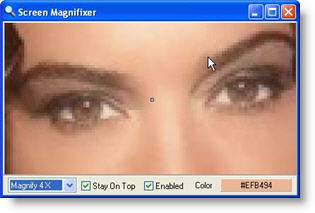
Magnifixer is my current favorite because it’s easy to tweak with nearly a dozen different settings as shown below. It’s one of the best free magnifiers I’ve found.

Tip: You can turn it into a portable version by simply copying the program folder onto a flash drive.

Screen Magnifier

image

From the authors:

Magnifixer is a screen magnifier utility. You can place it anywhere on your screen, make it any size you want and select a zoom level. Magnifixer will always show the area of your screen where the mouse cursor resides.

- Up to 40x Magnification
- Place anywhere on your screen
- Dual monitor supported
- Smoothing for better readability
- Cursor tracking or fixed location view
- Stay-on-top window option
- Color Display (HTML or RGB mode)
- Most settings are saved and reused
- Very simple and intuitive interface
- Uninstall option

Website: http://www.blacksunsoftware.com/screenmagnifier.html

Saturday, May 16, 2009

Firefox plugin: Drag & Drop.io

It’s hard to beat simple online file hosting services … until  you start looking at the features that come bundled with them.

Drop.io (pronounced drop-ee-oh) has a free file hosting service that literally has everything but the kitchen sink. They offer file hosting with a multitude of collaboration options like commenting, live chat, conference calls, voice mail, guest permissions, RSS feeds and email. Now they are offering a nice Firefox Plugin that lets you drop your files into their service with ease. Dropio is awesome … and the basic free service allows you to host 100mb in each drop.

See this screenshot of the admin page for a drop and you’ll see what I’m talking about.

See the video below for a demo of the Firefox plugin.

Here’s a short description from the dropio folks …

Drag & drop your files directly into Drop.io drops!
A drop is a chunk of space you can use to store and share anything privately (pictures, videos, audio, documents, etc.), without accounts, registration, or an email address. Drops are not "searchable" and not "networked;" they just exist online as private points for exchange between individuals or groups.
Create as many drops as you want in as little as two clicks and set things like a password, whether others can add to the drop, and how long you want it to exist (you can renew later). Drops can be flexibly used in a range of ways from sharing family photos and videos to collaborating on group projects.
For more information, go to
drop.io/about


Can I access Cosmopod from a public PC?

Note: Cosmopod service has been discontinued 

I will take a look around the net to see if there are any similar services.

Why would I use Cosmopod? It's a free hosted Linux computer desktop that has tons of applications such as Open Office and all the K-Desktop tools. Once you are logged into Cosmopod, your online transactions are encrypted and nobody on your network or on the net can see them. This is just what you need for a safe access on a public PC.

http://cosmopod.com

Go to this French website to get the Portable NX Client v1.5. Unzip the file onto one of your thumb drives.

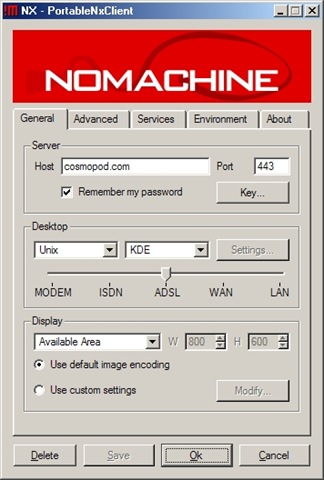
You then fire up your copy on the thumb drive and set it up as shown.

NxClientSetup

Once you get it set, just use it to log into your Cosmopod account.

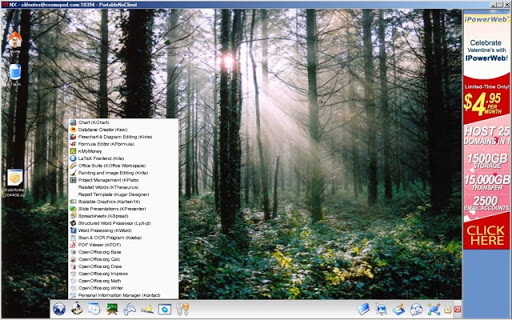
Here's a picture of my Desktop.

cosmopod_scn1

That's it. Enjoy your online desktop.

Saturday, June 07, 2008

ViStart and ViOrb - make XP's start menu work like Vista's

A few weeks ago, I tried a Vista styled start menu replacement for XP called Vista Start Menu. It worked nicely and even included the Vista style program search. This one seems to give you an even better simulation and the search feature is even faster than what Vista can give you. The only issue I had with this utility is a slow start-up time.

The ViOrb tool is a separate utility that replaces the green Start button with the fancy Vista styled Windows logo. I tried it out but I was much less impressed with it.

image

Here's where you can find both of these programs.

http://lee-soft.com/

Thursday, June 05, 2008

Windows Live Writer Gets Image Editing Capabilities

I occasionally use Windows Live Writer. I ran across this article at Techie Buzz and I'd really like to try out the new image editing features. However, I'm not up for a beta trial, so I'll wait patiently. If you aren't that patient, check out the preview link below.

(Excerpt from the article)

Windows Live Writer one of the most widely used blog editors (and my favorite too) has released a new Technical update which includes features like image cropping and tilting, more border styles for your images and support for centering images.

In addition to that you can also add image previewing effects from Lightbox right from the editor itself ...

Please note this is not a release version and can have bugs that may lead to crashes. If you are of the adventurous types and can’t wait to use the new features you can download the Windows Live Writer Technical Preview.

Read the rest of this article by Keith Dsouza

Saturday, May 17, 2008

Deepburner is great CD/DVD burner - now it's portable!

clipped from www.deepburner.com

DeepBurner Free Portable


Free Image Hosting at www.ImageShack.us DeepBurner Free Portable works straight from removable media, whether it's a USB flash drive, compact flash card, or even a good old floppy.

Benefits


  • DeepBurner Free Portable has all the features of DeepBurner Free

  • Keep program's settings and saved projects on a removable disk (USB Flash Drive)

  • Be confident because the disks will be burnt the way you need to, on any computer

  • And there's no need to install anything and therefore no traces are left in the system you are using the program on


Simply plug in your flash drive and burn any disks, using DeepBurner Free Portable. That simple.

Please note that DeepBurner Pro Portable is currently in the development phase and thus not available for public download, yet.

blog it

Thursday, April 03, 2008

The Squirrel Catapult

I had a good laugh today at work. One of the guys showed me this video that someone had sent him in email.


Sure it's in bad taste and I can't promise you that no squirrels were hurt during the filming, but just try not watching it more than once. LOL

Tuesday, March 25, 2008

Can I access Cosmopod from a public PC?


Why would I use Cosmopod? It's a free hosted Linux computer desktop that has tons of applications such as Open Office and all the K-Desktop tools. Once you are logged into Cosmopod, your online transactions are encrypted and nobody on your network or on the net can see them. This is just what you need for a safe access on a public PC.

http://cosmopod.com

Go to this French website to get the Portable NX Client v1.5. Unzip the file onto one of your thumb drives.

You then fire up your copy on the thumb drive and set it up as shown.

NxClientSetup

Once you get it set, just use it to log into your Cosmopod account.

Here's a picture of my Desktop.

cosmopod_scn1

That's it. Enjoy your online desktop.

Sunday, December 30, 2007

One in five PCs infected with rootkits?

A couple of weeks ago, I noticed an entry from Tom in his Malware Advisor blog with that glaring headline about one in five PCs with rootkit infections.

The Malware Advisor post pointed to an article at PC World which details results from people scanning with the Prevx CSI service. The statistics from the scans indicated a sharp increase in the number of rootkit infections. In my last issue of this newsletter, I wrote a bit about trying out a new scanner I'd found. It was called Prevx CSI. Small world, ain't it?

After reading Tom's post at Malware Advisor, I went to his security forum and I asked him if he thought there was any truth to the statistics. He didn't disagree with the article, but he hadn't seen any sharp increases in the forums. Later on in that forum thread, Lusher, one of the regulars here, posted his opinions as well.

The PC World article may or may not contain the whole story. In any case, rootkits are something you should worry about and I've posted reviews of a few rootkit scanners you might want to try out sometime.

If you ever have a suspicion that you do have a rootkit or other infections on your PC, be sure to drop by the Temerc forums and post a question for Tom. He'll get back to you lickety-split with just the right advice.

Quote from the website
More than 725,000 PCs were scanned using the Prevx CSI malware scanner over a two-month period. Of the around 291,000 users who scanned their PCs during October 2007, some form of spyware or malware was found on one in six.

Significantly, although rootkits were detected on 15.6% of PCs during October 2007, that figure had risen to 22% by early December.
Read the PC World article here

Friday, December 28, 2007

UltraDefrag - open source Windows defragger

You have quite a few good choices when it comes to free disk defragmenters. Here are a few I've written about in the past.
JkDefrag
AuslogicsDiskDefrag
DirMS
DiskeeperLite
DisKeeper9
PowerDefragmenter

Now I've found a new one called UltraDefrag and it's FOSS (free and open source software). I couldn't really find anything I didn't like about it.

I found 3 versions of it at the download page. I believe the i386 version is the one most of you should use. It looks like there are versions for AMD and 64bit as well.

Quote from the website
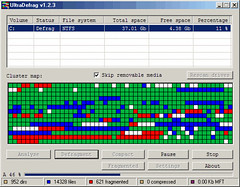
UltraDefrag is powerful Open Source defragmentation tool for Windows NT. It is very fast, because the defragmenting is done by kernel-mode driver. They are three interfaces to them: graphical, console and native. The GUI is very useful, because it represents your filesystem visually as a color coded cluster map. The console is another option for those that prefer the command line. It is also allows you to run UltraDefrag from the task scheduler and scripts. Finally, the native executable will run at boot time in a manner similar to chkdsk.

Website: http://ultradefrag.sourceforge.net/

tinySpell - a tiny spell checker for Windows

Recently, I was asked how to spell check pages at PBwiki, my webhost and employer. I answer all kinds of questions there as email tech support. I don't think I answered that one very well because I told them that PBwiki doesn't offer spell check when you are editing pages. What I should have told them about is the free spell-checker called tinySpell.

I'm sure many of you might remind me that Firefox already supports spell checking in text windows and forms. Sure it does, but it doesn't always work in AJAX driven windows such as WYSIWYG editors. The spell check in Firefox doesn't help the crowds of people who still use IE6 and IE7. For those of you who wish to add spell checking in Internet Explorer, you may want to try ieSpell.

I found that tinySpell worked very nicely in the PBwiki WYSIWYG editor once I'd gotten used to stopping whenever it beeped at me to indicate a misspelled word. When I selected a larger area of text, it also beeped to indicate any misspellings and helped me find where they were located.

I would prefer to get a visible indication when I misspelled words, but I can't complain. After all, it's a free application and it works exactly as it was designed. If I wanted more features, I could pay for a license of the tinySpell+ version.

image Quote from the website
Occasionally you need to check the spelling of words in an application that does not include a spelling checker and you don't want to launch your word processor just for that. This is when tinySpell becomes handy. It is a small utility that allows you to easily and quickly check the spelling of words in any Windows application.
tinySpell can watch your typing on the fly and alert you whenever it detects a misspelled word. It can also check the spelling of text that you copy to the clipboard.
tinySpell installs itself in the system tray for easy access. It comes with an American-English dictionary containing more than 110,000 words.

Website: http://tinyspell.m6.net/

WOT - plugin helps identify bad websites

How often do you end up at a website and wonder if it's safe to download a program there or to enter in an email address? If you already use SiteAdvisor, TrendProtect, or CallingId, you probably already have a good idea which sites are safe. WOT offers a similar protection to you but uses the power of all of it's users to help identify bad web sites.

I've been using WOT side by side with SiteAdvisor and I've gotten comfortable enough with it that I'm dumping SA in favor of WOT. I like the idea that I'm getting advice from fellow web surfers and not from a security company. We're all out there on the front lines and we need to stick together.

imageQuote from the website
Keep yourself protected from unreliable online vendors, spam, spyware, viruses, phishing and other scams. Unlike traditional security systems, WOT will warn you already before you interact with any suspicious websites. The color coding is like traffic lights: green to go, yellow to slow down and red to stop.

WOT has information on over 16 million websites.

Each community member can contribute. WOT is a democratic system where everyone can participate. You can share your knowledge to help other users surf safer by giving ratings to sites that you have used. The system processes ratings and calculates the reputation for each web site. Eventual attempts to manipulate the reputation data are eliminated by sophisticated algorithms.

Website: http://www.mywot.com/

Sunday, July 02, 2006

My first blog from Flock tools

Here's a neat little graphic from Thunder7, a friend of mine. He likes to play around with fractal images. Pretty cool, eh?

Blogged with Flock

Thursday, February 02, 2006

Form Letter Machine Review

While I was on the way home from work one day, I was thinking how I kept typing the same headings and formatting commands over and over again. Maybe I could write a quick and dirty program to help me with that? It needs to show me an interface that would let me paste in text and urls to make a new review with the formatting already done for me. My coding wish was granted when I accidently stumbled into the Form Letter Machine that evening.

The Form Letter Machine was fairly easy for me to figure out after I'd read the help files. Within a few minutes, I had made a template that saved me lots of time. Even though this program is free, the program's author requests that you register the program by signing up at his forum and requesting a key. When I did that, I discovered that the DonationCoder forum was full of people who love software and coders who love to make it. If you visit the Coding Snacks board, they'll even write a small program to grant your wishes.

Download the Form Letter Machine

Join the freeware fanatics at Clif Notes Newsletter today!

Saturday, September 10, 2005

Visit Freeware Wiki and Clif Notes Newsletter

Hi all,

This blog is just a work area. All the action is at
http://freewarewiki.pbwiki.com where I publish freeware reviews, Windows tips, security advice, and show you cool web sites and services.

I also publish a free weekly newsletter that is sent out on Sundays. It has all the latest posts from the wiki.
Clif Notes Newsletter now has over 1000 email subscribers and many others who view it at MSN Groups or RSS Feeds. You can sign up for it here.

I also have an archive with over 600 pages of past reviews. See them at http://clifnotes.mybesthost.com/reviews.


http://clifnotes.tk

Thursday, May 27, 2004

araneae.com: "You�ve reached the home of Araneae, a simple yet powerful text editor for the web. Araneae (pronounced ah-RAN-ee-ay) is a tool that provides only the features necessary to create stunning websites with all the latest web technologies. Araneae will not seize control of your code, leaving its interface astonishingly uncluttered and easy to use. Simply put, Araneae is just what you need. "
Computer Help Club: "Installing Husband 1.0
Dear Tech Support: Last year I upgraded from Boyfriend 5.0 to Husband 1.0 and noticed a distinct slow down in overall system performance - particularly in the flower and jewelry applications, which operated flawlessly under Boyfriend 5.0. In addition, Husband 1.0 uninstalled many other valuable programs, such as Romance 9.5 and Personal Attention 6.5, and then installed undesirable programs such as NFL 5.0, NBA 3.0. and NASCAR 4.1. Conversation 8.0 no longer runs, and Housecleaning 2.6 simply
crashes the system. I've tried running Nagging 5.3 to fix these problems, but to no avail. What can I do?
Signed, Desperate
Dear Desperate:
First keep in mind, Boyfriend 5.0 is an Entertainment Package, while Husband 1.0 is an Operating System. Please enter the command: 'http: I Thought You Loved Me.htm' and try to download Tears 6.2 and don�t forget to install the Guilt 3.0 update. If that application works as designed, Husband 1.0 should then automatically run the applications Jewelry 2.0 and Flowers 3.5. But remember, overuse of the above application can cause Husband 10 to default to Grumpy Silence 2.5, Happy Hour 7.0, or Beer 6.1. Beer 6.1 is a very bad program"
Quantum Muse - science fiction and fantasy stories and artwork: "We have the freedom to do just about any damn thing we please. We publish who we like, from countries all over the globe. We just don't care about people's politics. All we want to know is if they can write or not."
SpywareInfo :� Spyware and hijackware Removal Specialists: "Welcome to SpywareInfo, the spyware and hijackware removal specialists
Has some sleazy web site taken over your browser? Are you getting pop up ads even when your browser has been closed for some time? Are you infected with a spyware program that refuses to go away? If so, our message board has dozens of dedicated volunteers ready to give you step-by-step assistance to remove the malicious software and regain control of your PC. "

Saturday, May 22, 2004

Miscellaneous Tools: "CopyLock is a small program that allows replacing, moving, renaming or deleting one or many files which are currently in use (e.g. system files like comctl32.dll, or virus/trojan files.)
Add the files to update, click Apply, restart and that's it!
You can also list and edit the pending operations from the system after you ran an installer or view the processes which use the locked files."
Deepnet Explorer - Web + P2P + News Browser

This looks like a nice tabbed browser with lots of other cool features
+popup blocker
+password minder
+form filler
+p2p file sharing
+rss reader

Saturday, May 15, 2004

Tutorials for defending against Spyware/Hijacker Software
einfodaily.com SmartFix Security Center Homepage
|MG| Free Download - SmartFix 2.6

To provide the best computer experience available, SmartFix is an all-in-one system and security repair tool that allows you to fix and eliminate the pesky bugs and problems that make slow down your computer through easy one-click menu options. Furthermore, SmartFix adds an extra layer of protection against the security attacks and hazards of the Internet by repairing the security flaws on your system. To make your computer experience even smoother, an intelligent pop-up ad blocker is included to block those annoying spam pop-up and pop-under ads, as well as an easy-to-use system monitor taskbar that allows you to keep track of your computer's health.

Features include:

- Stylish system monitor taskbar that allows you to keep track of your computer's health.
- Quick access to system repair tools through the system tray icon
- Integrated Laptop energy saving mode to keep your laptops running longer
- Quick access to Windows Update to keep to your computer up to date
- Integrated pop-up blocking capabilities to get rid of those annoying pop-up ads

Whats new:

- New improved worm intrusion prevention feature for eliminating deadly worms
- New improved spyware intrusion prevention feature for eliminating intrusive spyware applications
- New Security Alert console for keeping up with the latest security threats
PSPad - HTML editor, PHP editor, JavaScript, ASP, Perl, XHTML, C, MySQL, CSS, Hexa editor
Net Transport - multi-thread download assistant
Download details: Sasser (A-F) Worm Removal Tool (KB841720)
Enabling the Windows XP Internet Firewall - Lockergnome & TechSmith's Video Tip of the Week #1

Saturday, May 01, 2004

YourWare Solutions Company Website

FreeRam XP Pro - supposed to help free up ram.
Win 95/98/ME/2000/XP
Disoriented Labs - open-source applications and utilities for Windows

FreeExtractor - Create self extracting zip files
Microsoft Baseline Security Analyzer V1.2

Looks like a good tool for winnt win2k and xp
TextCalc -- A Calculator/Text Editor Combined
Looks like a useful item for documentation.